Midjourney vs DALL-E vs Stable Diffusion - Which AI Image Generator Wins in 2026?
Midjourney, DALL-E, and Stable Diffusion are the three biggest names in AI image generation but they serve very different needs. Here is an honest 2026 comparison to help you pick the right one.
Get the daily AI & tech briefing.
If you have spent any time looking into AI image generation, you have probably run into these three names more than any others. Midjourney. DALL-E. Stable Diffusion. They come up constantly, they get compared constantly, and most of the comparisons online are either outdated or written by someone who spent thirty minutes with each tool.
This one is not that.
We tested all three across real use cases - blog graphics, social media content, artistic images, photorealistic outputs, and text-inside-image generation. Here is what actually separates them in 2026, who each one is built for, and how to decide which one belongs in your workflow.
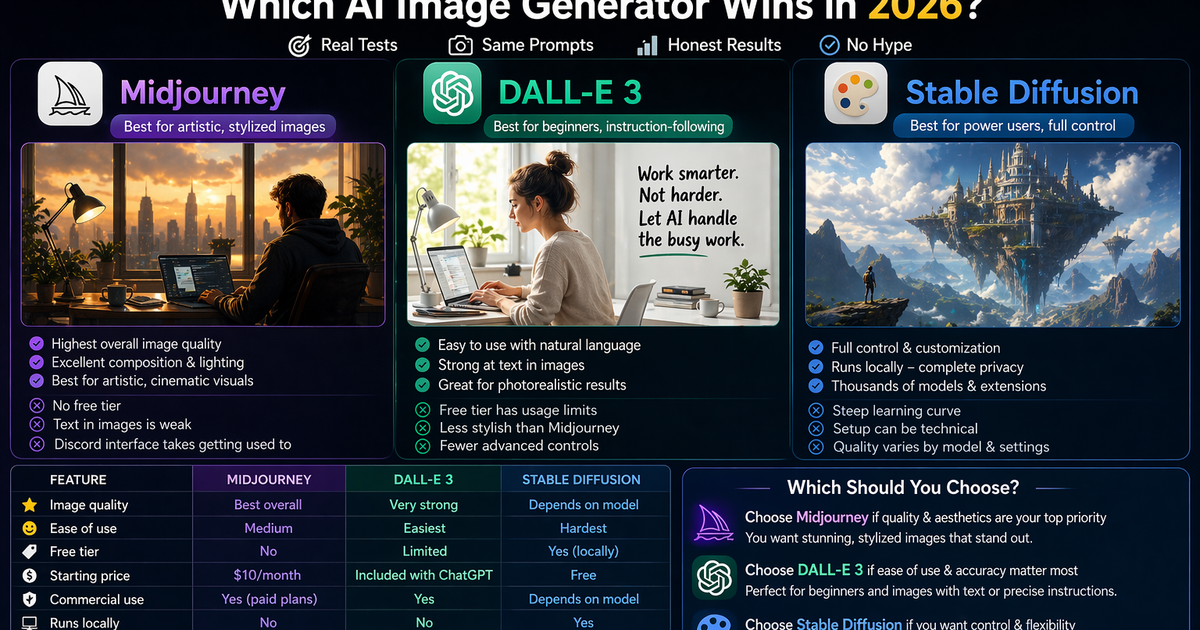
Quick Comparison Table
Midjourney | DALL-E 3 | Stable Diffusion | |
|---|---|---|---|
Image quality | Best overall | Very strong | Depends on model |
Ease of use | Medium | Easiest | Hardest |
Free tier | No | Limited | Yes (locally) |
Starting price | $10/month | Included with ChatGPT | Free |
Commercial use | Yes (paid plans) | Yes | Depends on model |
Best for | Artistic, stylized images | Beginners, instruction-following | Power users, full control |
Runs locally | No | No | Yes |
Text in images | Weak | Strong | Variable |
Midjourney - Still the Quality King
If you asked most AI artists, designers, and visual content creators which tool produces the most impressive images, the majority would still say Midjourney. That has been true for a couple of years now and it remains true in 2026, even as competitors have significantly closed the gap.
What Makes Midjourney Different
Midjourney's outputs have a distinctive quality that is hard to articulate but easy to recognize. Images tend to be more compositionally coherent, more aesthetically interesting, and more visually polished than what you get from most other tools on a first generation. The lighting feels more considered. The colors are more cohesive. The overall result just looks more intentional.
This is partly because Midjourney has been trained with a heavy emphasis on aesthetics specifically. The team behind it clearly cares about visual quality above most other metrics, and that priority shows up in the output.
It is particularly strong for:
- Stylized and artistic images where aesthetic quality matters
- Cinematic and editorial-style photography looks
- Fantasy, sci-fi, and concept art style content
- Any image where you want an immediately striking visual result
- Social media content where visual impact is the whole point
How to Access Midjourney
This is where things get slightly awkward. Midjourney operates primarily through Discord, which is a barrier for anyone not already using that platform. You join the Midjourney Discord server, type prompts in a channel, and receive your images there. A web interface has been gradually rolling out but Discord remains the primary experience for most users.
Once you are past that learning curve, the actual prompting process becomes second nature. Midjourney responds well to descriptive language, style references, and specific aesthetic direction. Commands like --ar 16:9 to set aspect ratio and --style raw to reduce the automatic beautification become quick habits.
Where Midjourney Falls Short
No free tier is the biggest barrier. Midjourney has not offered a meaningful free option for a while and shows no signs of changing that. You pay from day one.
Text inside images is also a persistent weakness. Ask Midjourney to generate an image with readable words in it and you will frequently end up with garbled, decorative-looking text that does not actually say what you wanted. Newer versions have improved this but it remains behind DALL-E 3 and Ideogram for text-heavy images.
The Discord interface, while functional, feels dated compared to the clean web apps competitors offer. If you are used to a simple text box and a generate button, Midjourney's workflow takes some adjustment.
Best for: Content creators, social media managers, designers, and anyone who wants the highest quality artistic and stylized images and is willing to pay for them.
Pricing: Basic plan $10/month for about 200 images. Standard plan $30/month for unlimited relaxed generations. Pro plan $60/month for faster and more generations.
DALL-E 3 - The Most Accessible Option
DALL-E 3 is OpenAI's image generation model, and if you have a ChatGPT account you already have access to it. That single fact makes it the most accessible of the three for most people.
What Makes DALL-E 3 Different
Where Midjourney rewards learning its prompting system, DALL-E 3 works best with natural language. You describe what you want conversationally and it generates it. More importantly, when the result is not quite right, you can tell ChatGPT what to change in plain language: make the background darker, remove the text on the wall, make the person look younger. The conversational refinement loop is genuinely useful for non-designers.
DALL-E 3 is also the strongest of the three for generating text inside images. Blog post headers with titles on them, quote graphics, announcement images - these are areas where Midjourney struggles and DALL-E 3 handles them well.
It is particularly strong for:
- Beginners who want usable results quickly without a learning curve
- Photorealistic images of people, products, and everyday scenes
- Images that need readable text as part of the design
- Situations where you want to iterate conversationally
- Anyone already using ChatGPT who does not want to add another tool
How to Access DALL-E 3
If you have ChatGPT, go to a conversation and ask it to generate an image. That is it. No separate account, no new interface to learn. ChatGPT Plus users get more image generations per day. Free tier users have limited access.
You can also access DALL-E 3 through Microsoft Copilot Image Creator for free, which uses the same underlying model with some limitations on stylistic control.
Where DALL-E 3 Falls Short
For purely artistic, stylized, or cinematic images, Midjourney's output still looks more impressive. DALL-E 3 excels at following instructions precisely but that precision can sometimes produce images that look competent rather than visually striking.
The free tier limits are also real. Heavy image generation use will hit the daily cap quickly and you will be asked to wait or upgrade.
Stylistic control is less granular than Stable Diffusion and less refined than Midjourney's parameter system. For users who want very specific aesthetic control, there is a ceiling.
Best for: Bloggers, content creators, and casual users who want good results quickly without learning a new tool, especially those already using ChatGPT.
Pricing: Limited access on the ChatGPT free tier. Full access with ChatGPT Plus at $20/month. Also available free through Microsoft Copilot Image Creator.
Stable Diffusion - Maximum Control, Maximum Complexity
Stable Diffusion is a fundamentally different kind of tool from the other two and understanding that difference is key to understanding whether it belongs in your workflow.
Midjourney and DALL-E 3 are closed, commercial products. You use them through their interfaces, you pay for access, and you work within the boundaries they set. Stable Diffusion is open source. The model weights are publicly available, the community is massive, and the customization possibilities go far beyond what either commercial tool offers.
What Makes Stable Diffusion Different
Because Stable Diffusion is open source, developers around the world have built on top of it. There are thousands of community-trained models for specific styles and subjects. There are tools like ControlNet that let you control poses, compositions, and depth maps with extraordinary precision. There are workflows for inpainting, outpainting, upscaling, and image-to-image transformation that go beyond what commercial tools offer.
You can run it entirely on your own computer with no usage fees, no subscriptions, and no content restrictions from a company's content policy.
It is particularly strong for:
- Power users who want complete control over every aspect of the generation process
- Developers building AI image generation into their own applications
- Users who generate very high volumes of images and want to avoid per-image costs
- Anyone who wants to fine-tune models on their own images for a specific style
- Privacy-conscious users who do not want to send images to a third-party server
How to Access Stable Diffusion
There are several ways to run Stable Diffusion.
Locally on your own computer requires a capable NVIDIA GPU with at least 4GB of VRAM, ideally 8GB or more. You install Automatic1111 or ComfyUI, download model weights, and run everything yourself. This is free to operate after the initial hardware investment but requires genuine technical setup.
Cloud-based interfaces like DreamStudio, NightCafe, and Leonardo AI let you use Stable Diffusion through a web interface without local hardware. These typically charge per image or on a subscription basis.
Google Colab lets you run Stable Diffusion in the cloud for free with limits through a notebook interface, which is a middle ground between full local setup and a polished commercial product.
Where Stable Diffusion Falls Short
The learning curve is real and steep. Getting the most out of Stable Diffusion requires understanding prompt weighting, negative prompts, samplers, cfg scale, and a range of technical parameters that Midjourney and DALL-E 3 handle automatically. Out of the box, without community models and custom settings, the output quality is noticeably behind Midjourney.
The setup friction for local use is also significant. Installing dependencies, managing model files, and troubleshooting errors is a genuine time investment that most casual users do not want to deal with.
Best for: Technically comfortable users who want maximum control and customization, developers building image generation into applications, high-volume generators who want to avoid per-image costs, and anyone who wants to experiment with fine-tuned models for specific styles.
Pricing: Free to run locally with hardware costs applying. DreamStudio credits start at around $10 for 1,000 image generations. Various third-party Stable Diffusion interfaces have their own pricing.
Head to Head - Same Prompt, Three Tools
To make the comparison concrete, here is how each tool handles a typical content creator use case. The prompt: a professional-looking hero image for a blog post about AI productivity, showing someone working at a clean modern desk with a warm, optimistic mood.
Midjourney would likely produce an immediately visually striking result with excellent lighting, a refined color palette, and a cinematic quality. The composition would feel intentional. It would look like it belongs on the cover of a tech magazine.
DALL-E 3 would produce a more literal interpretation of the prompt. The desk, the person, and the warm mood would all be clearly represented. It would look professional and usable but less immediately striking than Midjourney. If you then said make the lighting warmer and remove the coffee cup, it would do exactly that.
Stable Diffusion with a base model and no customization would produce a more variable result that might look great or might need several regenerations. With a community model specifically trained on interior and lifestyle photography, you could potentially match or exceed DALL-E 3's output. With ControlNet, you could specify the exact composition. The ceiling is high but the floor requires more work to get off.
Which Should You Actually Use?
Choose Midjourney if visual quality is your top priority, you are creating content where the image needs to immediately impress, and you are willing to pay a monthly subscription and spend time learning the prompting system. If you are a serious content creator or social media manager and image quality matters to your brand, Midjourney is worth the investment.
Choose DALL-E 3 if you want good results quickly without learning a new tool, you already use ChatGPT, you need images with readable text in them, or you are new to AI image generation and want the most accessible starting point. For most bloggers and casual content creators, DALL-E 3 through ChatGPT is the right call.
Choose Stable Diffusion if you are technically comfortable and want maximum control, you generate high volumes of images and want to avoid per-image costs, you want to fine-tune models for a very specific style, or you are building image generation into an application or workflow. It rewards the time investment but requires a genuine one.
Use more than one. Many serious content creators use Midjourney for hero images and visually important content while using DALL-E 3 for quick, functional images where raw aesthetic quality matters less. There is nothing wrong with having both in your toolkit.
A Note on Other Options
These three are the most talked about but they are not the only options worth knowing about.
Adobe Firefly is worth mentioning specifically because it is the safest choice for commercial use. It was trained on licensed content, which means every image you generate is commercially safe without the legal grey areas that can apply to other tools. If you are creating images for client work or commercial campaigns, Firefly belongs in your evaluation.
Ideogram has carved out a clear niche as the best tool for generating images with readable, well-rendered text inside them - something all three of the tools in this comparison struggle with to varying degrees.
Frequently Asked Questions
Is Midjourney still the best AI image generator in 2026? For aesthetic quality and stylistic consistency, yes. The gap between Midjourney and its competitors has narrowed but for visually polished, artistically impressive images, Midjourney still leads. Whether that quality gap justifies the cost compared to strong free alternatives depends on how important image quality is to your specific work.
Is DALL-E 3 better than Midjourney? DALL-E 3 is easier to use and better at following precise instructions and generating readable text in images. Midjourney produces more aesthetically impressive results for artistic and stylized content. Which is better depends entirely on your use case.
Is Stable Diffusion free to use? Yes, Stable Diffusion is free and open source. You can run it locally at no cost if you have a capable GPU. Cloud-based versions charge per image or on a subscription. The open source model is free but getting the most out of it requires time and some technical knowledge.
Can I use AI-generated images commercially? It depends on the tool and plan. Midjourney's paid plans allow commercial use. DALL-E 3 images are yours to use commercially. Stable Diffusion's commercial rights depend on which model weights were used. Adobe Firefly is the safest commercial option as it was trained on licensed content specifically.
Does Stable Diffusion require a powerful computer? Running it locally requires a modern NVIDIA GPU with at least 4GB of VRAM, though 8GB or more gives significantly better results. If your hardware does not meet those specs, cloud-based versions let you use it without local requirements.
Last updated April 2026. Pricing and features change regularly so always check each tool's website for current plans and terms.
Related Articles
Don't miss what ships next
The daily briefing on AI & tech, straight to your inbox.
Written by
Zach GreeneI write about the tools, trends, and breakthroughs shaping the future of AI, breaking down complex ideas into clear, actionable insights. From emerging startups to the latest in AI tech, I focus on what actually matters and what’s worth paying attention to. My goal is to help you stay ahead in a rapidly evolving space.